







ClinexGen Book a session
Healthcare · Laboratory and integration · Healthcare integration engine

One integration layer between all your clinical systems

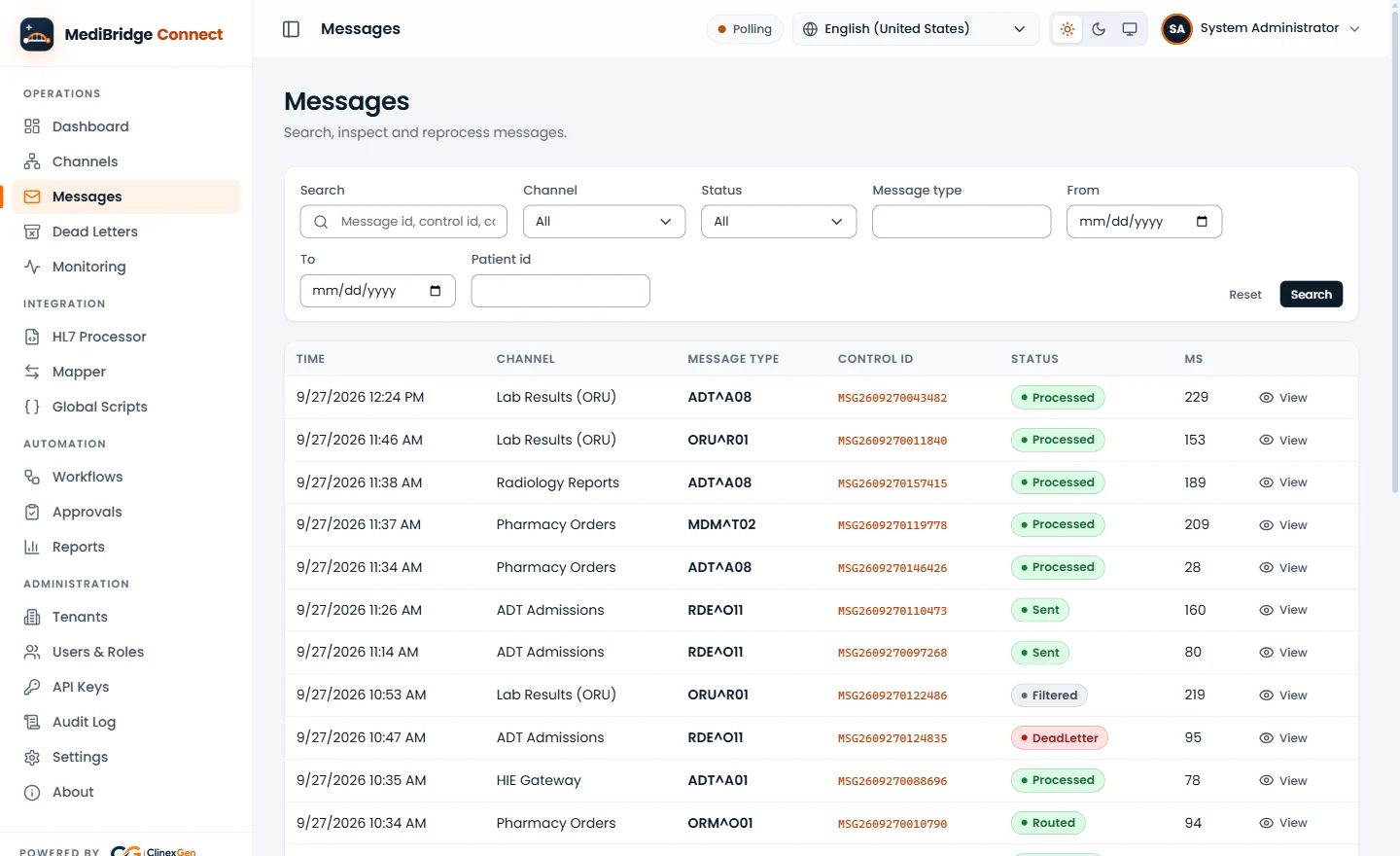
MediBridge Connect receives, stores, converts and routes clinical messages — so results and orders move between analyzers, LIS and HIS automatically, safely and visibly, with nobody re-typing them.

MediBridge Connect operator console, Messages screen — shown with test data

Real product screen, shown with synthetic sample data

ASTME1381 / E1394 per analyzer
HL7 v22.3 – 2.5.1 over MLLP
FHIR R4two-way with HL7 v2
16ready alert rules
The challenge

Results that are re-typed are results at risk

Most labs and hospitals already have good systems. What they lack is a dependable way for those systems to talk to each other.

Analyzers that stand alone

Each analyzer speaks its own dialect, so results are read off a screen or a printout.

Transcription errors

Every re-typed value is a chance to mistype a result, swap a sample or miss a flag.

Reports that wait

Results sit on the analyzer until someone is free to enter and verify them.

Point-to-point spaghetti

Every new HIS, LIS or device becomes another custom interface to build and maintain.

Silent failures

When a link drops, messages can be lost and nobody is told.

How it works

Every message follows the same five steps, on every channel

Each connection is a channel: a source, optional filters, transformations, routing rules and one or more destinations.

  1. 01

    Receive and store

    Every message is saved before it is processed

  2. 02

    Validate and filter

    Checked against its profile; repeats dropped

  3. 03

    Transform and map

    Converted to the format the next system expects

  4. 04

    Route

    Sent to one or more destinations

  5. 05

    Deliver and retry

    Each destination retries; what fails waits for review

What it does

Everything Connect runs, day to day

Reliable channels

  • Store-and-forward and de-duplication
  • Per-destination retry
  • Dead-letter queue and reprocessing

Mapping without code

  • A visual mapper
  • Copy, lookup, date, template and segment operations
  • Sandboxed JavaScript for special cases

Workflows and approvals

  • Action, condition and approval steps
  • Started by hand, on a schedule, by message or API

Patient matching

  • A patient index fed by HL7 ADT and FHIR Patient
  • Weighted matching across name, birth date and identifiers
  • Identifiers searched through encrypted blind indexes

Dashboards and reports

  • Live volumes and errors
  • Anomaly detection
  • Seven report types in PDF, Excel or CSV

Open APIs

  • REST, GraphQL and live SignalR
  • Scoped API keys
  • Swagger documentation
Why Connect

What makes Connect different

Stored first. Kept, not dropped.

Nothing is processed before it is saved. While the LIS is down, results are kept and redelivered; a database outage goes to an encrypted spool.

Built for the lab bench

One ASTM connector per analyzer, network or serial: results, host query and order download, proven on a built-in simulator first.

Security built in

AES-256-GCM field-level encryption at rest with key rotation, TLS 1.2 / 1.3 in transit, optional two-factor sign-in.

Problems flagged early

Health checks with 16 ready alert rules, a console on desktop and mobile, and silent analyzers flagged to the LIS.

Who it is for

Built for the people who own the work

Lab director

Diagnostic labs

Results flow into your LIS with flags and QC kept apart, and the bench knows when a line goes quiet.

CIO / IT head

Hospitals

One place to run HIS, LIS, PACS and device interfaces, with monitoring, audit and access control.

Product and delivery teams

HIS / LIS vendors

Add analyzer and HL7 / FHIR connectivity without building your own interface engine.

Administrator

Hospital administration

Less manual entry, and a clear audit trail of who saw patient data.

Standards

Configured, not programmed

Standards we work with — not certifications.

ASTM E1381 / E1394HL7 v2.3 – 2.5.1FHIR R4DICOM Storage SCPMLLP + TLSMQTTREST · GraphQLHTTP · WebSocketFile · Email

Deploy it your way

Docker ComposeKubernetesHelm chartLinux packageWindowsOperator apps
Going live

From first analyzer to full rollout

Step 1

Discover

Every system, analyzer and interface, and its messages

Step 2

Configure

Channels, mappings and routing for each connection

Step 3

Test

On the analyzer simulator, then your reference analyzer

Step 4

Go live

Site by site, with monitoring and alerts in place

Accepted on your reference analyzer before go-live: host query answered, results match the analyzer screen, LIS outage recovered, cable pulled and reported.

Trust

Who sees what, and how it is protected

You stay in control of your data — on our cloud in India or on your own servers.

  • Field-level AES-256-GCM for patient data and secrets, with key rotation
  • TLS 1.2 / 1.3 with HTTPS redirection and HSTS
  • Password policy, optional TOTP two-factor sign-in and lockout
  • Sign-in required on every API call; 21 permissions and 6 built-in roles
  • Audit trail of patient-data reads and administrative actions
  • Patient data redacted from logs; export and erase on request

We claim no certification or independent audit; compliance also depends on how Connect is deployed and run.

Next step

See Connect on your own data

Scoped by the interfaces you switch on. Start with a first analyzer or system, then add the rest.

Discovery callYour analyzers, HIS / LIS and interfaces
Interface reviewYour systems and messages mapped
Pilot connectionA first analyzer, proven end to end
Roll outThe rest, with monitoring in place
One partner, one support desk

Often paired with

Laboratory information management

MediBridge LabCoreby ClinexGen

For diagnostic, hospital and reference labs, and lab networks.

  • 22 modules
  • Two-step sign-off
  • SHA-256 audit chain
  • Links to your HIS over HL7
Designed to support NABL / ISO 15189:2022
Explore LabCore
Hospital information system

Nalam360by ClinexGen

For multi- and super-speciality hospitals and groups.

  • ICU and theatre charting
  • Lab, radiology, blood bank
  • IP billing, insurance, TPA
  • Multi-branch operation
122 modules · 40 in general availability
Explore Nalam360
Clinic and hospital, up to 100 beds

Nucleusby ClinexGen

For clinics with beds and hospitals up to 100 beds.

  • Front office and OP queue
  • Clinical record and MRD
  • In-patient, ICU and theatre
  • Pharmacy, lab and billing
Appointment to final bill on one record
Explore Nucleus
Chat on WhatsApp